

Excel solutions that work - and that your team loves.
I build tailor-made Excel tools, automated reports, and interactive dashboards — so your team spends less time working with data and more time making decisions.
- Dashboards
- Reports
- Automation
Excel consulting with a Microsoft MVP
30 minutes. An honest assessment of where your time is being lost.
In 30 minutes, we’ll review your Excel processes together, and I’ll show you exactly where automation and better tools could make the biggest difference.
- Free
- No obligation
- 30 minutes

THE TRANSFORMATION
Here is what the difference looks like.
Same data. Same numbers. This time, in a tool people actually enjoy using.
Before
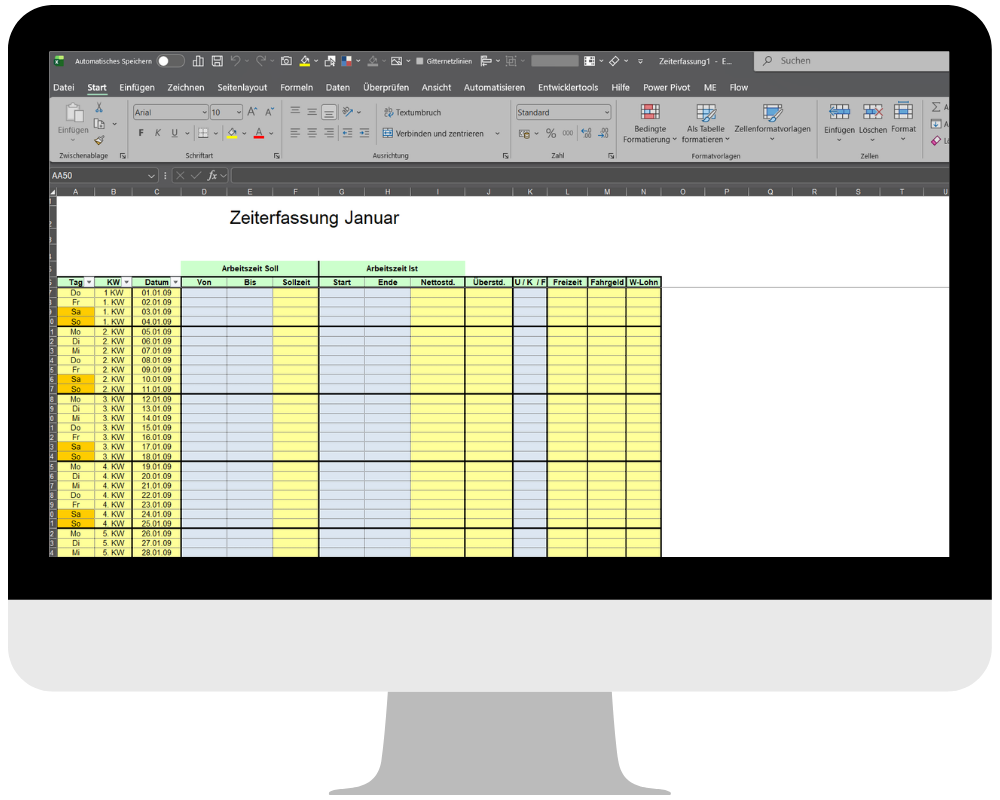
Hours of manual work.

After
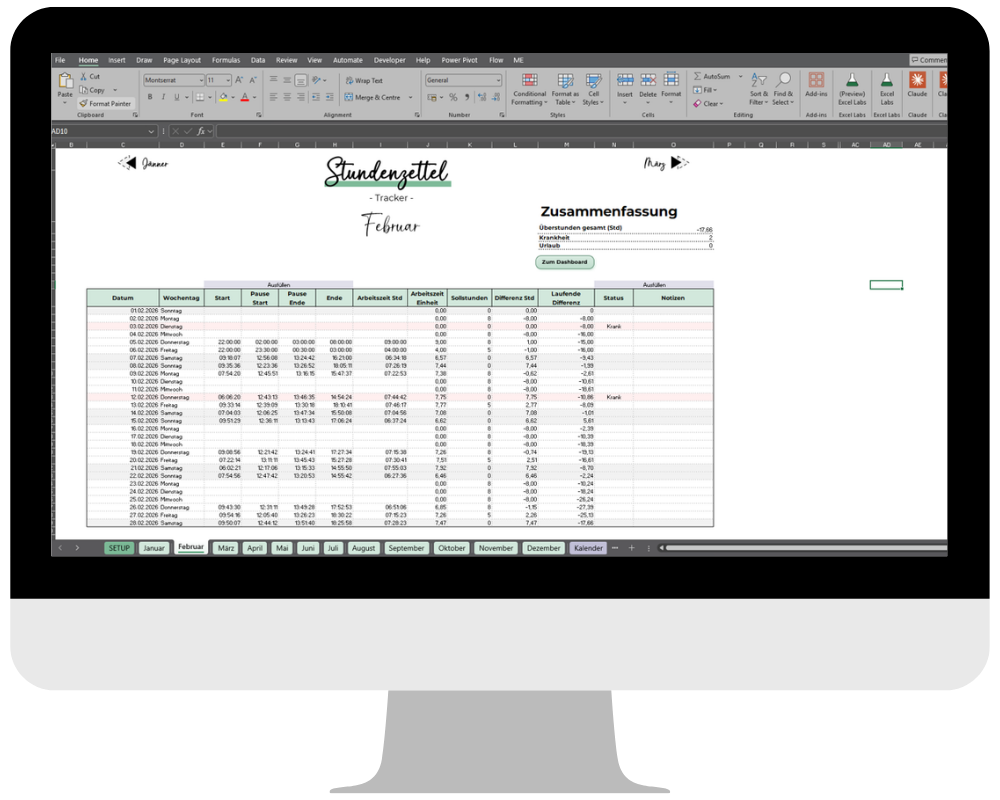
Done at the touch of a button.
Less effort
Reports that update themselves — no more copy-pasting.
Actually used
No more wrestling with the file. Your team uses the tool because it’s genuinely easy.
Beautiful and considered
Tools you’ll want to open. Clear, visual, and designed to stand out.
DOES THIS SOUND FAMILIAR?
Six things that quietly eat up your week.
The Monday copy-paste
Every week, the same three hours. Moving data over, checking it, formatting it. That adds up to 150 hours a year before the real work even begins.
Errors no one finds until it is too late
One wrong cell, one broken formula. The report is incorrect. Someone in the next meeting is the first to notice.
Files no one wants to touch
Built four years ago by someone who left long ago. It still somehow works — until anyone changes anything.
Know-how that leaves with the team
The two people who really knew how it worked are gone. All that remains is a vague Teams chat history and quiet hope.
No time to improve things
Every quarter, someone says "we should rebuild this." Every quarter, day-to-day work swallows the plan.
Numbers without clarity
The data is there — in six versions, across four tabs. Decisions are based on whichever file someone opened most recently.
50+
Tools built
From automation to dashboards — for teams that want to make real use of Excel.
6+
Years of experience
In consulting, training, and data analysis — since November 2020.
2x MVP
Microsoft most valuable professional
Recognized by Microsoft for Excel expertise and community engagement.
1,000+
PROFESSIONALS TRAINED
In live courses, corporate in-house training, and university courses.
How we work together
From the first conversation to the tool that belongs to you.
- Step 1
Free initial consultation
Duration:
30 minutes
Requirements:
Online
30 minutes, no pressure. We’ll look at your situation together and identify where automation genuinely makes sense. Bring: The file that frustrates you the most. Leave with: An honest assessment of whether I can help.
- Step 2
Analysis & concept
Duration:
A few business days
You receive:
Concept · Scope · Price
I analyze your processes, data, and goals, then develop a clear proposal outlining the scope, deliverables, and price.
- Step 3
Implementation
Duration:
1 week to several months, depending on the project scope
I build the solution with regular updates, check-ins, and interim results. No surprises.
- Step 4
Handover & training
Duration:
1–2 sessions
Included:
Documentation · 30 days of support
A finished solution, complete documentation, and team training. Your team can start using it independently right away.
What I build for you
Tailor-made solutions
01
Dashboards & reports
Interactive Excel dashboards that support decision-making — always up to date, at the touch of a button.
03
Controlling & finance
Actuals vs. plan, forecasts, and budgeting — professionally built and easy to use.
04
Reporting tools
Monthly reports that update themselves — no more manual preparation.
05
Data structuring & consolidation
Bring data from multiple sources together cleanly to create a reliable foundation for everything else.
06
Excel tool development
App-like Excel tools that teams genuinely enjoy using — stable, documented, and scalable.
Tool selection based on needs, not preferences — the right tool for every project
- MS Excel
- Power Query
- Power BI
- Power Apps
- Power Automate
- VBA
- SQL
- Office Scripts
Quick fix
A small problem, solved in 48 hours.
A broken file, an urgent formula, or a small optimization that can’t wait — I deliver a clean solution without a discovery call or waiting around.
Turn-around
max. 48 hours
Score
A single, self-contained task
Format
Asynchronous, file-based
Quick Fix Ticket
Formula errors & fixes
Small automations
Pivot tables, charts, formatting
Delivery:
max. 48 hours
Quick fix
Explore my projects.
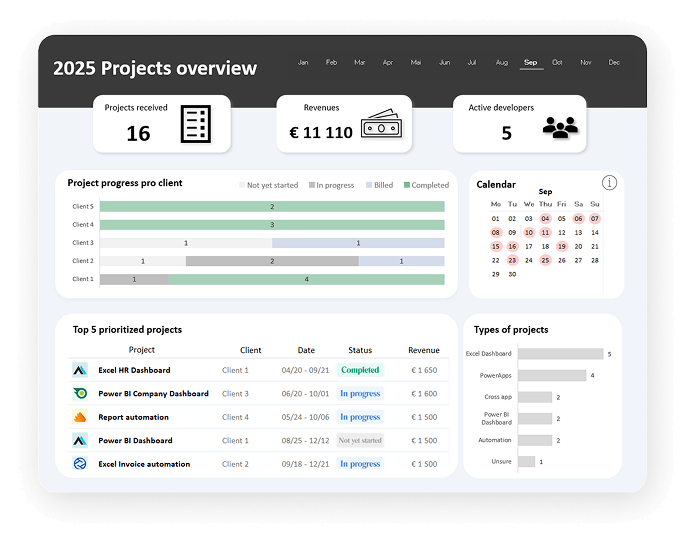
Project management dashboard
All projects, always in view
Project progress, deadlines, budget, and team at a glance — interactive, dynamic, and without an external tool.
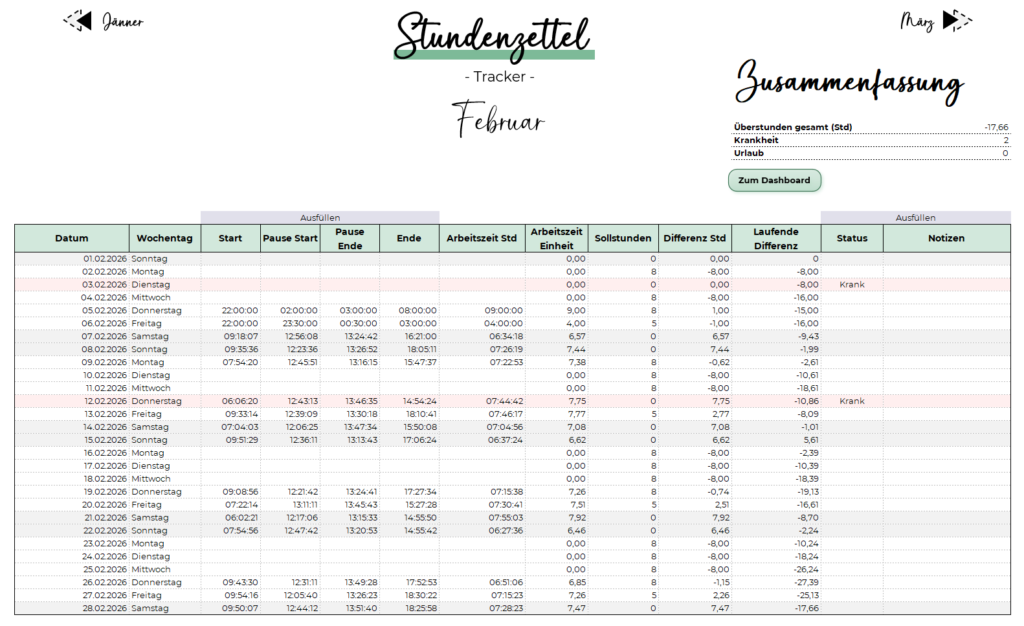
Timesheet tracker
Complete time-tracking tool for the entire year
Working hours, overtime, vacation, sick leave, and public holidays — all in one tool. Dynamic, adaptable to every year, and fully automated. Includes monthly reports, an overview dashboard, and a calendar.

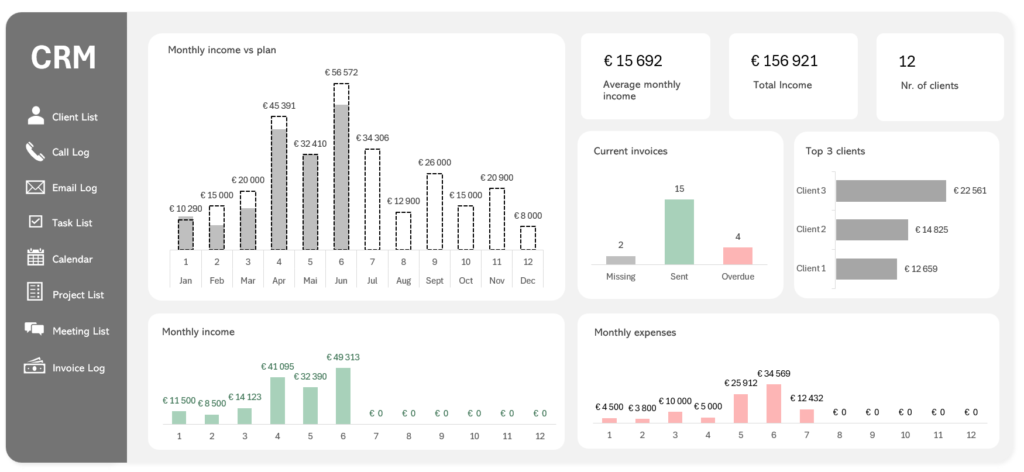
Complete CRM system in Excel
No expensive tool, no subscription. This fully functional CRM system was built directly in Excel — with a dashboard, income and expense overview, customer management, call log, invoice log, tasks, and calendar. Dynamic and ready to use.
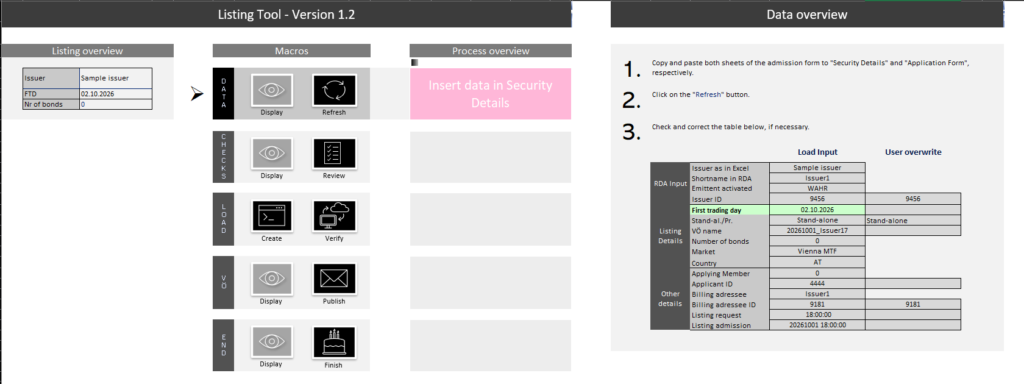
Process automation
From form to system — at the touch of a button
As soon as a customer submits the form, the tool takes over. It checks for errors, allows manual corrections, and transfers the data directly into the internal system. Includes Word and Outlook integration at the touch of a button. What used to take hours of manual work now runs error-free in minutes.
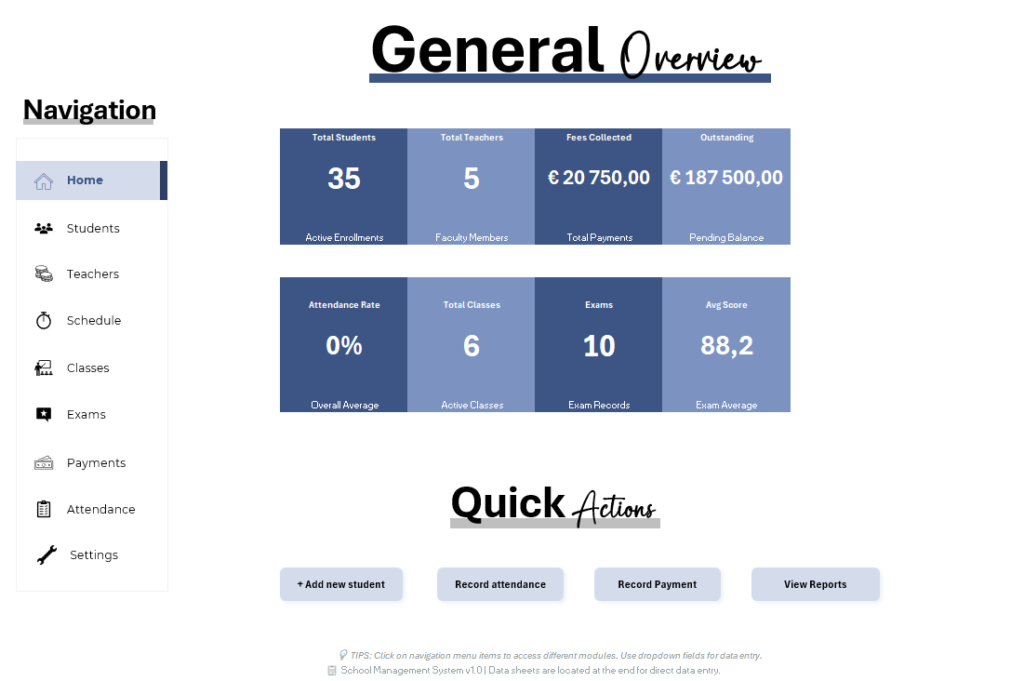
School administration
Everything a school needs — in one tool
From attendance and grades to timetables and payments, this system covers everything a school needs every day. Includes a smart timetable that automatically takes availability into account. No external system, no subscription. Just Excel — with everything in one place.
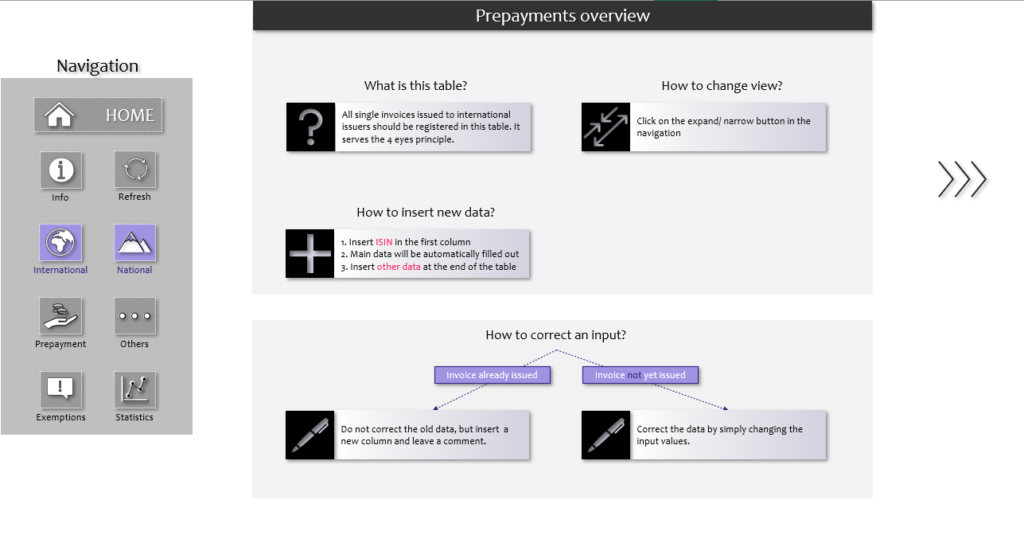
Invoice management
Track invoices — automatically and reliably
A complete invoice-tracking system with categorization, internal rules, and automatic alerts. Everything is recorded, checked, and analyzed from creation through payment. The dashboard provides a clear overview of open, sent, and overdue invoices at any time.
Invoicing tool
Automated invoicing tool for the Vienna Stock Exchange
A fully automated invoicing process — create, calculate, and generate invoices at the touch of a button. The team saves 5+ hours of manual work every week.
Invoicing tool
Automated invoicing tool for the Vienna Stock Exchange
A fully automated invoicing process — create, calculate, and generate invoices at the touch of a button. The team saves 5+ hours of manual work every week.
FAQ
Frequently asked questions
If you have any other questions, feel free to send me a message.
How long does a project take?
Quick fixes: within 48 hours. Small tools: 1–2 weeks. Complex dashboards or automations: 3 weeks to several months. An accurate estimate is available during the initial consultation.
How much does a project cost?
I work on an hourly basis — the exact effort depends on the project. An initial estimate is available free during the initial consultation.
Can an existing Excel file be optimized?
Yes, generally possible. Sometimes it can make more sense to rebuild — we can discuss this together.
Do I need Excel skills myself?
No — you don’t need to know Excel. I build solutions that are user-friendly, clear, and designed so your team can use them straight away, without a learning curve. Personal training is always included so everyone can use the tools with confidence.
How does the collaboration work?
Remote or on-site — depending on your needs and what we agree together. Both are possible, and we’ll find the format that works best for you and your team.
Do you only work with Excel?
No — it depends on the issue; we can also use Power BI, Power Query, Power Apps or VBA. I choose the tool that makes the most sense for you.
I need urgent help — can it be done quickly?
Yes, for small tasks I offer a Quick Fix Service. A clean solution within 48 hours. Just ask.
Ready for Excel that really works?
30 minutes • via video call • live review of one of your files • immediate, actionable recommendations